How to stop YouTube recommendations on your home page
Open YouTube and the home page comes first, full of videos the recommendation algorithm picked. If you keep opening YouTube for one video and clicking something else on the home page, the home page recommendations are the first thing you'd want gone.
There's no single "turn off recommendations" switch. Instead, you can turn off watch history, which feeds the recommendations, or tell YouTube one by one which recommendations you don't want. This guide follows YouTube Help, and I checked where the menus are in the Android YouTube app (21.44) on November 15, 2026. I didn't actually change the settings. YouTube's screens change often, so names may differ slightly by device and app version.
1. Turn off and delete watch history (home page recommendations go away)
In short: this is the only way to remove home page recommendations entirely, and it only works if you delete your history too.
To turn off watch history in the phone app:
- Signed in to the YouTube app, tap You (your profile picture) at the bottom → Settings (gear) at the top right
- Manage all history
- On the Controls tab, uncheck Include the YouTube videos you watch (to turn off YouTube history entirely, tap Turn off)
On my device, the step 3 screen opened in English (CONTROLS, Include the YouTube videos you watch). It may differ depending on your phone's language.
On a computer, YouTube Help says to go to My Activity (myactivity.google.com/product/youtube), click Controls on the left, then Turn off.
There's an important condition. YouTube Help says that if you have no relevant or significant recent watch history and have indicated you don't want recommendations based on it, features like recommendations on the YouTube homepage are removed (View, delete, or turn on or off watch history). So if you only turn history off and already have a lot of it, home page recommendations may stay. You need to delete your past history on the same screen for the home page to empty out.
Even when the home page is empty, YouTube Help says the homepage will still show the search bar and the left-side menu (How YouTube recommendations work). You can still see videos from channels you subscribe to in the Subscriptions tab.
Good to know:
- According to the description on that same screen, history isn't only used for better recommendations, but also to remember where you left off. Turning it off and deleting it may take away conveniences like that too.
- Videos you watch while history is off won't show up in your history. YouTube Help doesn't offer a way to bring deleted history back, so think it over before you delete.
- YouTube Help ties watch history only to the home page. The next video next to the one you're playing (Up Next) is described separately as based on the video you're currently watching.
2. Cut them down with Not interested and Don't recommend channel
In short: if you don't want to delete your history, you can tell YouTube which recommendations you don't want, one at a time.
On the home page or a watch page, tap ⋮ (More) next to a video to find these options (Manage your recommendations):
- Not interested: fewer recommendations like this video. You can also say why.
- Don't recommend channel: stops recommending videos from that channel.
This reduces recommendations rather than removing them, so new videos will keep being recommended. You can clear this feedback under Other Google activity in My Activity.
3. Show fewer Shorts on the home page
In short: pick Show fewer Shorts from the ⋮ above a Shorts shelf.
When you scroll to a Shorts shelf on the home page, tap ⋮ at the top of the shelf → Show fewer Shorts. For stronger ways to block Shorts, see How to hide YouTube Shorts.
That's what you can do inside YouTube
All three methods work on the home page. Method 1 removes home page recommendations but requires deleting your history, and methods 2 and 3 only reduce them. The next video shown beside the one you're watching, and autoplay after a video ends, work separately from these. I'll cover turning off autoplay in another guide.
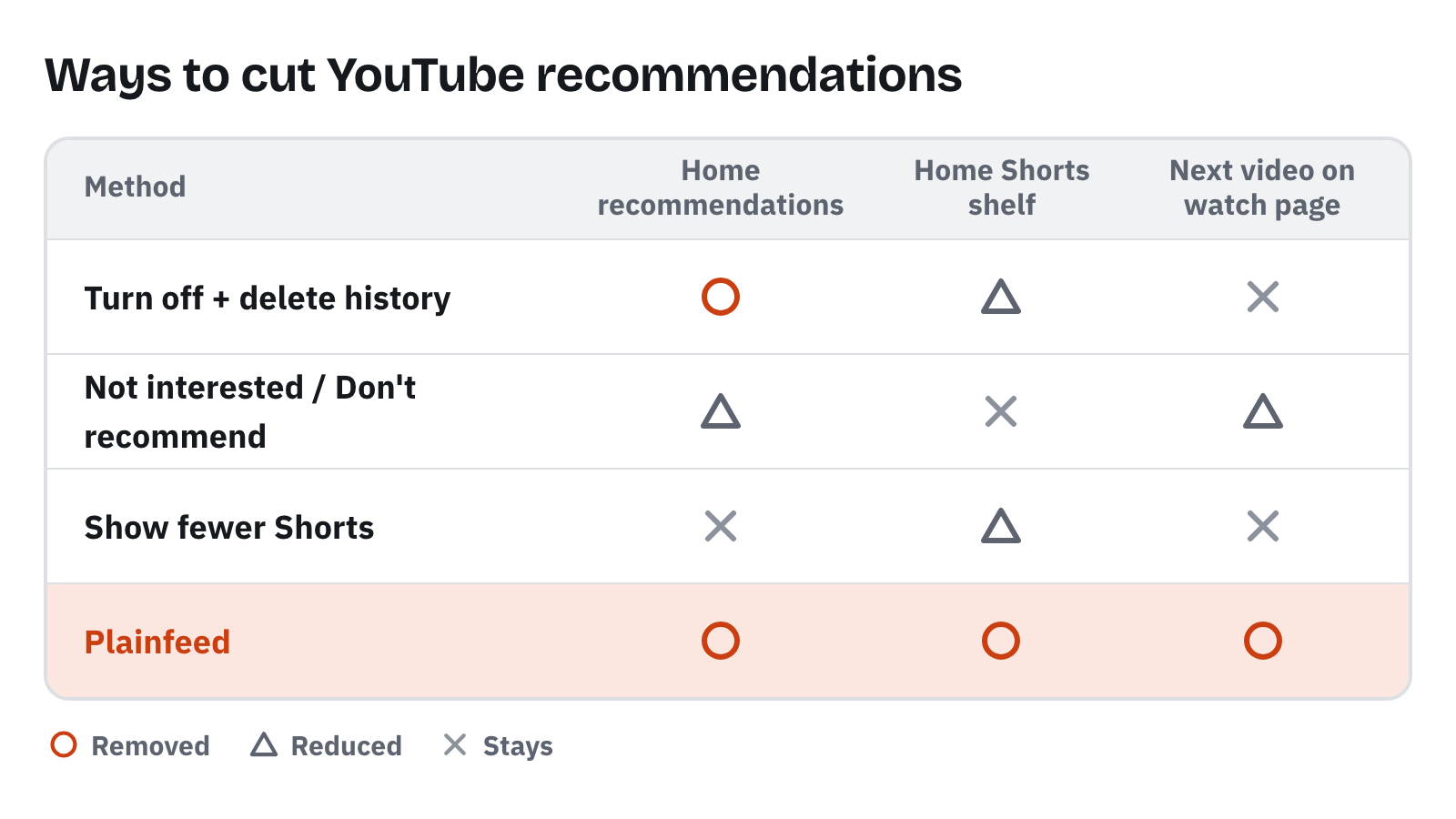
○ removed · △ reduced · ✕ stays.
To see only your subscriptions without recommendations: Plainfeed
In short: you can see only new videos from your subscriptions, without deleting your watch history.
Plainfeed is a separate website, not an official YouTube service. Add the channels you want, and only their new videos stack up in the order they were posted. There's no home page picked by the recommendation algorithm, and the only videos that play next come from channels you added. You don't need to delete your watch history.
- Import your subscriptions with your YouTube account in one go, or paste channel URLs.
- Shorts are left out from the start.
- ▶ Play goes through only the videos you haven't watched, then stops.
Wrapping up
If you want the home page recommendations gone, turning off and deleting watch history is the most reliable way inside YouTube. If you'd rather keep your history, Not interested and Don't recommend channel cut them down bit by bit. There are also browser extensions that hide the home page, but you have to install them on each device.